
App Inventor Link: http://ai2.appinventor.mit.edu
Tutorial Checklist: https://bit.ly/2GcHU6V
Essential Questions:
- What is the role of creativity in designing an attractive, functional, and accessible graphical user interface?
- What is the role of creativity in designing a mobile application to solve a problem?
Objectives:
- Learn the mechanics of using App Inventor to build apps
- Learn how to design an app’s user interface with the App Inventor Designer and its behavior with the Blocks Editor.
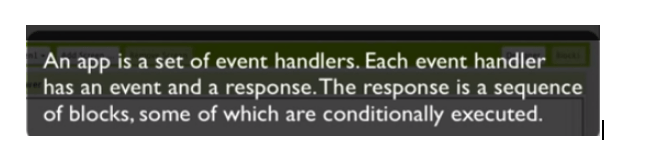
- Understand that an app’s behavior consists of event handlers– blocks that specify how an app responds to each event.
- Understand that an app can make decisions using a conditional (if) block.
- Understand that a component has a set of properties and that a property is a memory cell that can be changed to modify how a component looks and behaves.
- Learn how to test an app, how to deploy it to a device, and how to publish it on a portfolio and the App Inventor Gallery.
Did you know?
- Building apps are not as hard as they might think, especially with App Inventor.
- App Inventor is a blocks-based programming language for building mobile apps
- Inventor pieces work (left to right then top to bottom).
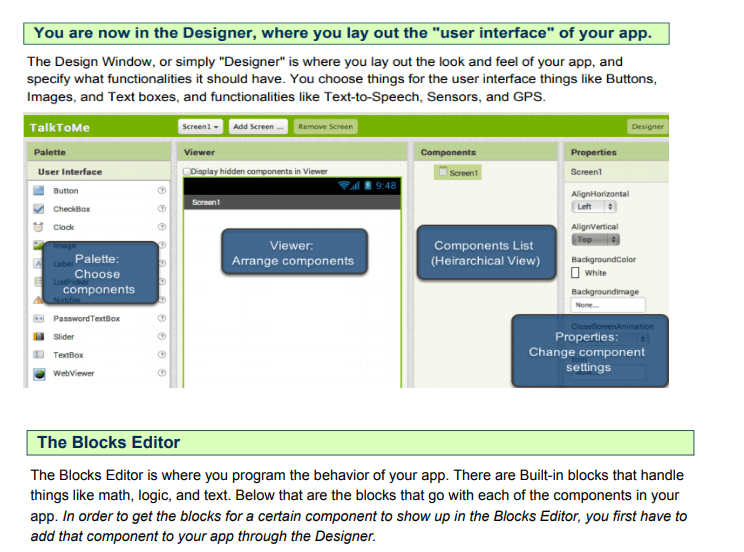
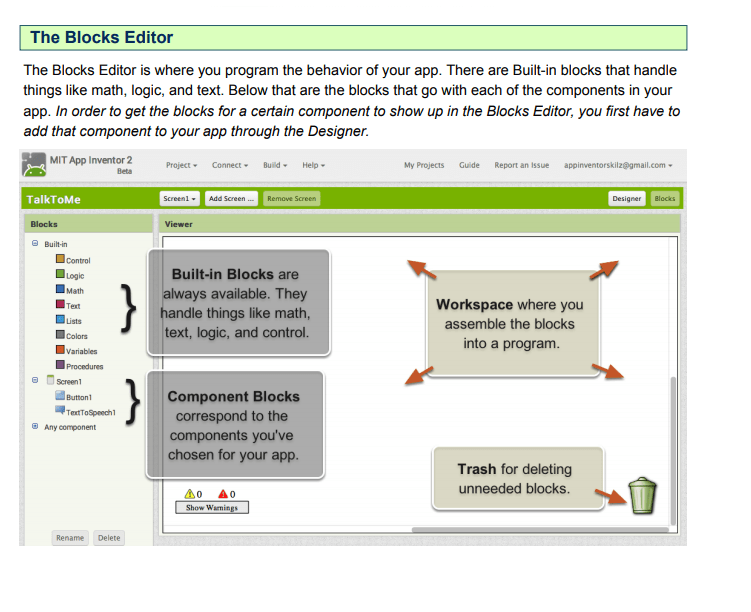
Designer and Blocks Editor http://appinventor.mit.edu/explore/designer-blocks.html

Understanding Blocks: http://appinventor.mit.edu/explore/understanding-blocks.html
Introduction: What does this app do? https://sites.google.com/site/appinventor/lesson-introduction-to-app-inventor
|
|
App Inventor Tutorials Checklist
Beginning Tutorials:
- Beginning App Tutorials:http://appinventor.mit.edu/explore/ai2/beginner-videos.html
 Mrs. Horwitz's Web Site