

Audience: College Graduates
To practice all of the tags you have been introduced to so far, create a website that resembles the “Web Site Development Process Handout”.
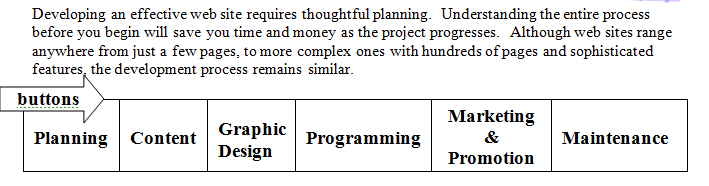
WEB SITE DEVELOPMENT PROCESS HANDOUT
Page 1:
Step 1: Type the Web Site Development Process Handout in one web page. On the top should be an index/buttons of the 6 steps, with active links to each section. (Save it as yourname-period#-develop)
Step 2: Find images and include them in the page. Also, Identify tags you would like to add to the website.
Step 3: Add navigation – buttons
- Example of how to put buttons on your website-code:
- Example of Dreamweaver-adding buttons-navigation
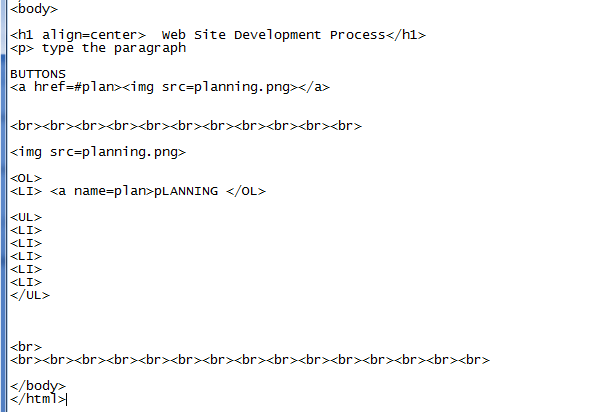
 Go were you want the link to lead you to: Click on Anchor
 Click on link icon and fill out the first two items -click ok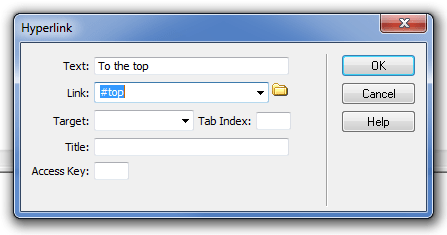
 This is what it should look like in your design view of Dreamweaver.
Page 2:
Create a 2nd webpage: (Save it as: yourname-period#-programming). Save it in the same folder as your first webpage (develop)
You should include the following links on this web page
- one that is an image that links to HTML Goodies– http://www.htmlgoodies.com
- one that is text that links to Web Design Group http://www.htmlhelp.com/design/style/.
- Add at least 2 additional links to outside websites that give information on web design or html tags.
-
Link from the Programming section (click here for more info) on the first page to this page, as well as a link from this page to develop.
- Consistent design
- When the links are activated, they should open in a new browser. You should have at least four links and some pics on this page.
Honors/Extra: Search for 2 articles that talk about the website development process. Summarize the article and cite the source.
Additional Criteria
- Cite all of your sources correctly using the M.L.A. Style for Electronic Formatting.M.L.A. Style for Electronic Formatting (Title, URL, Date) in alphabetical order
- Add images
- Keep in mind navigation techniques.
- Table for the buttons
- Use the ordered list start attribute
- Make both web pages consistent in design
- Add a meta tag (keyword) (chapter 6 slide 20).
- Add a copyright link to the http:///www.learnthenet.com, as that is where the handout originated from.
- Buttons can be created from the
- Make sure you connect both websites together with a link.
 Mrs. Horwitz's Web Site